If you’re just starting your financial journey, budgeting might sound complicated, boring, or even stressful. But here’s the truth: it doesn’t have to be. With the right app, budgeting can actually feel empowering like finally getting a handle on your money instead of guessing where it went.
In this guide, I’m breaking down the best budgeting apps for beginners, ranked by how easy they are to use. Whether you’re a student, young professional, or side hustle warrior, these tools can help you track your spending, build savings, and make smarter money moves without needing to be a math genius.
Why Budgeting Apps Are a Game Changer for Beginners
Let’s be real: writing down every expense in a notebook isn’t for everyone. Most Gen Z and millennials live on their phones so it makes sense to manage your money from your phone too.
Here’s what a good budgeting app should do:
- Help you track your spending without stress
- Make it easy to set goals (like saving for a trip or paying off a card)
- Give you a clear picture of your money at any moment
- Bonus: the best ones even give gentle nudges or reminders to keep you accountable
Budgeting apps also offer the benefit of automation. Many of them sync with your bank accounts and automatically categorize your transactions. This helps you spend less time typing things in and more time making better decisions.
With that in mind, let’s get into the top picks for beginner-friendly budgeting apps in 2025.
1. Cleo – Best for Money Motivation & Personality
Ease of Use: 9/10
Available on: iOS & Android
Cost: Free plan available; upgrades include:
- Cleo Grow: $2.99/month (for savings tools + high-yield savings)
- Cleo Plus: $5.99/month (cash advances up to $250)
- Cleo Builder: $14.99/month (secured card + higher advances)
Cleo uses AI-powered chats and memes to make money feel less intimidating. You connect your accounts, and it analyzes your spending, sets savings goals, and even roasts you if you need tough love.
Best Features:
- Chat-based budgeting
- “Roast” and “Hype” modes
- Automatic savings suggestions
- Expense tracking with a fun twist
Why Beginners Love It: It doesn’t feel like a finance app. It feels like a friend who keeps it real. The informal tone, humor, and simplicity help reduce anxiety and make money feel manageable, even if you’re just starting out.
2. YNAB (You Need A Budget) – Best for Getting in Control
Ease of Use: 7/10 (some learning required)
Available on: iOS, Android, Desktop
Cost: $14.99/month or $109/year (save $70 with annual plan)
YNAB follows a “zero-based budgeting” method where every dollar you earn gets a job. You manually assign money to categories like rent, groceries, or savings. It takes practice but builds strong financial awareness.
Best Features:
- Manual control over every dollar
- Great financial education and support
- Progress tracking and detailed reports
- Syncs across devices
Why Beginners Love It: Once you get the hang of it, YNAB is a powerful tool for changing spending habits. It’s ideal for anyone looking to dig deep and fully take control of their money, especially those trying to break the paycheck-to-paycheck cycle.
3. Goodbudget – Best for Envelope-Style Budgeting Budgeting
Ease of Use: 8.5/10
Available on: iOS, Android, Web
Cost: Free basic plan; $10/month or $80/year for Premium
Goodbudget brings the classic envelope system to your phone. You assign cash to virtual “envelopes” and spend from them. It doesn’t link to your bank, which gives you more hands-on control.
Best Features:
- Envelope budgeting
- Manual entry helps build awareness
- Syncs with a partner
- Simple, clean design
Why Beginners Love It: It teaches spending discipline in a very visual and beginner-friendly way. It’s especially useful for people who like a tactile approach to money management but want the convenience of digital.
4. Monarch Money – Best All-in-One for Tracking + Planning
Ease of Use: 9/10
Available on: iOS, Android, Desktop
Cost: $8.33/month (billed yearly at $99.99) or $14.99/month
Monarch offers a clean, modern dashboard where you can view all your accounts, set financial goals, and track your net worth. It also supports syncing with your partner or advisor.
Best Features:
- Connect unlimited accounts
- Visual financial goal tracking
- Subscription tracking
- Great interface for big-picture planning
Why Beginners Love It: It combines budgeting and planning in one beautiful, easy-to-use platform. Monarch is perfect for people who want more than just basic budgeting, it’s for those who want to plan ahead, not just track the past.
5. PocketGuard – Best for Simplicity & Overspending Alerts
Ease of Use: 9.5/10
Available on: iOS, Android
Cost: $6.25/month (billed yearly at $74.99) or $12.99/month
PocketGuard shows you what you have “in your pocket” after bills and goals are accounted for. It’s great for those who tend to overspend or want a super simple overview.
Best Features:
- “In My Pocket” safe spending tracker
- Bill tracking and alerts
- Rollover budgeting
- Unlimited categories and accounts
Why Beginners Love It: The interface is clean, the concept is simple, and it reduces budgeting anxiety. PocketGuard is a great starter app for someone who doesn’t want to think too much but still wants to stay on track.
Bonus: Google Sheets + Templates – Best Offline Option for Full Control
Not ready for an app? Google Sheets is still a powerful way to start budgeting. You can customize it however you want, track expenses manually, and print your monthly plan if that works better for your style.
Best Features:
- 100% customizable
- No app required
- Great for learning budgeting basics
- Can be used with printable planners
Why Beginners Love It: It keeps things simple and builds awareness through manual tracking. It’s also completely free, which makes it a great option for students or anyone just testing the waters.
How to Choose the Right Budgeting App for You
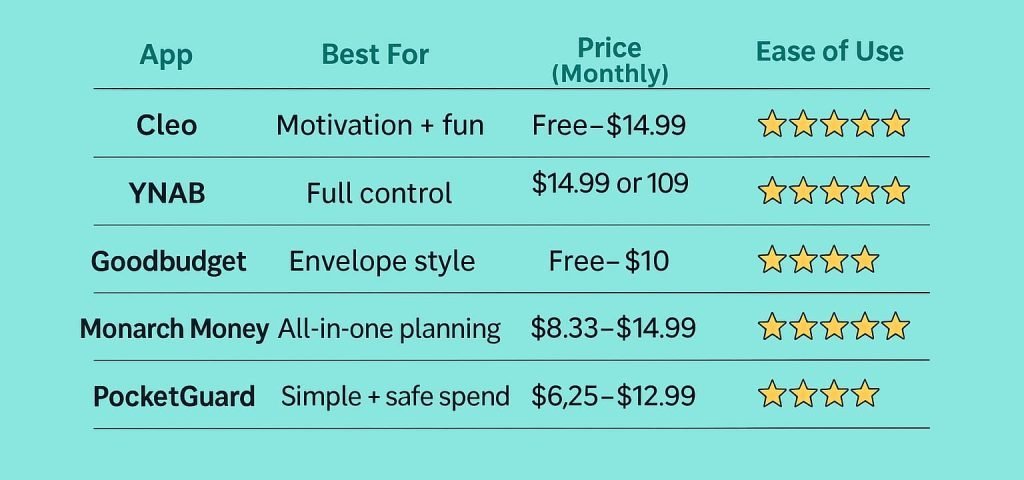
There’s no single budgeting app that works for everyone. The best one for you really depends on your money goals, personality, and how you like to manage your finances.
If you want something fun and low-pressure to help you stay motivated, Cleo is a great place to start. If you’re serious about full control over every dollar, YNAB (You Need A Budget) is one of the most powerful options though it has a bit more of a learning curve. For those who like the envelope system, Goodbudget keeps things simple and familiar.
If you’re looking for a full financial planning tool that goes beyond simple budgeting, Monarch Money offers all-in-one tracking for spending, saving, and investing. And if you want something lightweight to track your daily spending and prevent overspending, PocketGuard is an excellent choice.
You can also mix and match depending on your needs. Some people track their daily expenses in PocketGuard, set big-picture goals in Monarch, and still use Google Sheets or spreadsheets to double-check progress. Your budgeting system doesn’t have to be one-size-fits-all. The best budgeting app is the one you’ll actually stick with and use consistently.
Final Thoughts: Keep It Simple, But Get Started
Budgeting doesn’t have to be hard, and it doesn’t have to be perfect. The important thing is to start. Choose an app that matches your personality and your goals, and don’t be afraid to test a few out before you commit, you’ve got options. Once you’ve picked a budgeting app, the next step is building your first budget. If you need help getting started, here’s a simple guide on how to build a beginner budget even if you hate numbers. Now take the first step toward clarity with your money.
Have a favorite budgeting app or a question? Let me know in the comments. I’d love to hear from you.
And if you found this guide helpful, consider subscribing so you don’t miss new posts, free tools, and practical tips to help you stay in control of your money.